Power on Reset – Capacitor calculations

Power on Reset – Capacitor calculations

Note : Written up for the Z80 processor, though same principal applies to others.

While power on instability is a less of an issue with modern processors, older, retro, MPU's definitely need reset on power up. Newer chip tend to have this build into the chip.

The issue is that the processor needs the power with in the chip and surrounding circuit to settle before it starts to operate. The surrounding peripherals, RAM/RAM, will also need time to settle.

If the processor has not settled, it will crash immediately, and you need to push the reset button, assuming you have one, to get the system running. RESET also resets the processor and sets the program counter to 0x00 where the Z80 starts execution from. The solution to this is very simple - You need to keep the MPU in Reset for a number of clock cycles. Then you can release the Reset and the processor will start to work.

The Z80 Manual states that it needs at least 3 full clock cycles of RESET at start-up.

The circuit is a simple RC delay but there is an additional component that is required - A Schmitt trigger gate - usually an inverter. More on this in a moment. The RC circuit is designed to keep the Reset in a Low state (assuming ACTIVE LOW) for a small duration before pulling the Reset High. Visa versa for ACTIVE HIGH Reset.

This is also called a soft start.
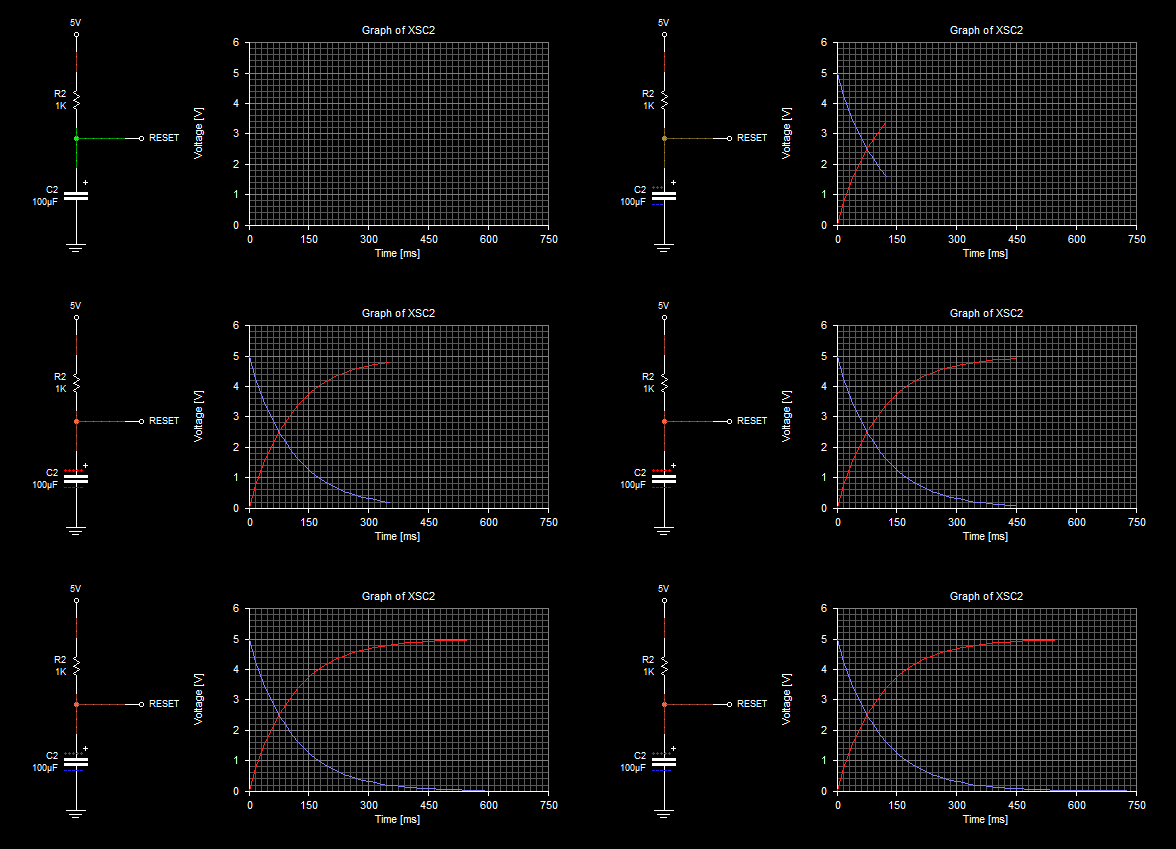
Red - Voltage of the Reset Line
Blue - Voltage drop over resistor
When power is applied, the voltage on the Reset line will be 0 volts as 5v will be dropped over the resistor. As the capacitor starts to charge up, so the voltage of the Reset line will rise at a rate determined by the RC calculation and the voltage drop over the resistor will fall until the Reset line is 5V (which is the charged capacitor).

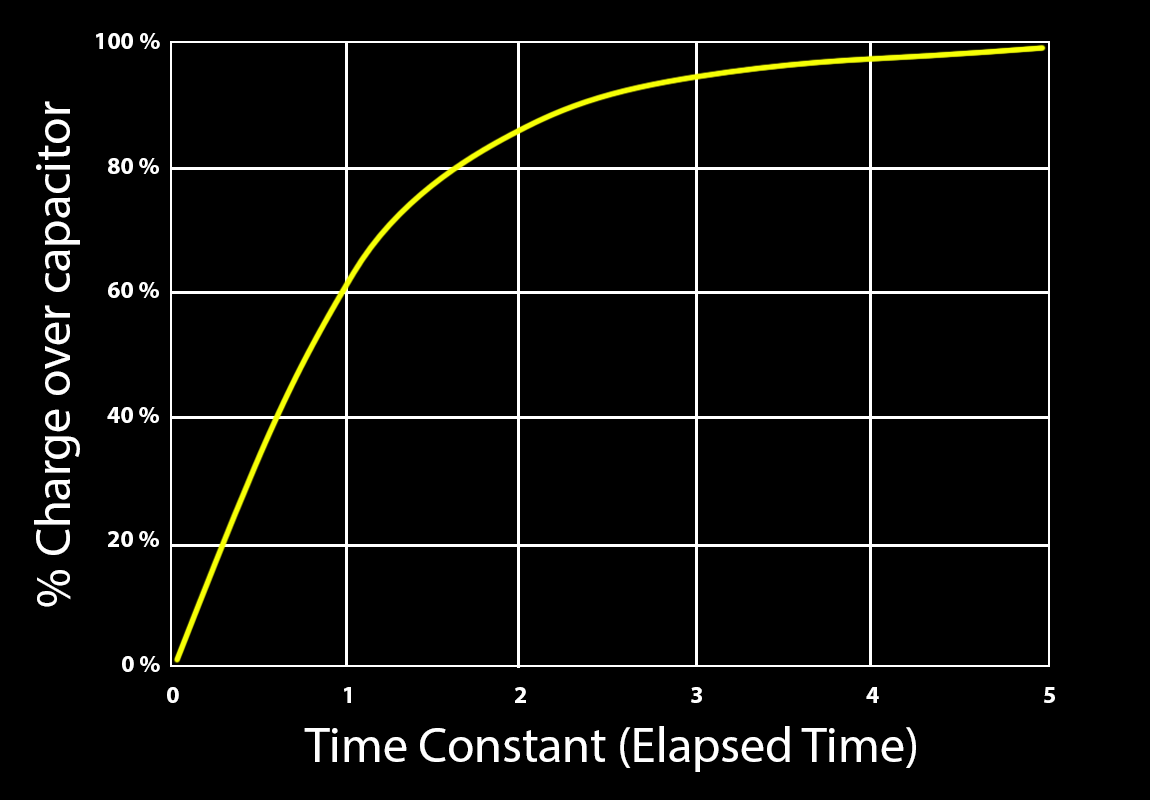
The RC calculation gives a Time Constant, which is a ratio of charge. In general the time taken to charge a capacitor (to 99%) is 5TC or 5 x the time constant.

time constant = resistance X capacitance.

The Z80 datasheet says "The Reset must be pulled low for a minimum of 3 full clock cycles."

So how long do we need the delay to be? Well first we need to know the voltage the Z80 will consider 'High'. For that we need to look at the Z80 datasheet. According page 8 of the specification, the INPUT HIGH voltage is 2v. This kind of matches TTL logic levels which is between 2v and 2.7v.

So we need to keep the voltage below 2v for a least 3 clock cycles.

To know how long thee clock cycles are, we can calculate that. Assume the Z80 is running at 4Mhz. That will mean each clock period is 250ns.

The 3 clock cycles will be 250nS x 3 = 750nS. To be safe we can double that to 6 clock cycles which would then be 1.5uS (micro seconds).

In reality and especially with a homebrew PC or something where the start-up time is not critical, then the amount of time is really not that important as long as its over the 3 full clock cycles.

You can easily set a 100ms time just to be totally on the safe side.

The main thing to ensure is that the Reset line is kept below 2v for that duration. Lets work with a 100ms duration. Looking at the charge curve of a capacitor
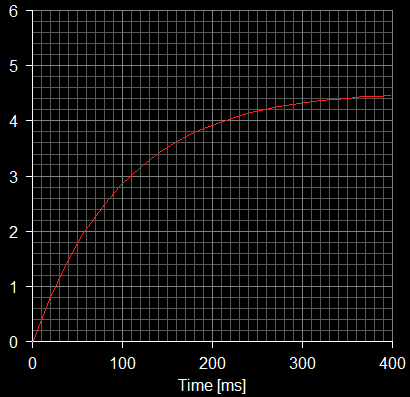
As this is a 5v system, we cannot just use the RC5 calculation for the capacitor charge time. We need to calculate the RC time constant so that the voltage across the capacitor is <2v until 100ms.


What we need to calculate is what is the time constant to achieve a rise of up to 2v at 100ms when the source voltage is 5v?

From there we can pick a value for either R or C can calculate the other.

The maths around this might look a bit hairy but easy enough to plug into a calculator.

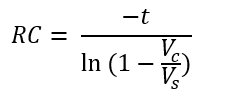
The equation to use is below - This is derived from capacitor charge equation.
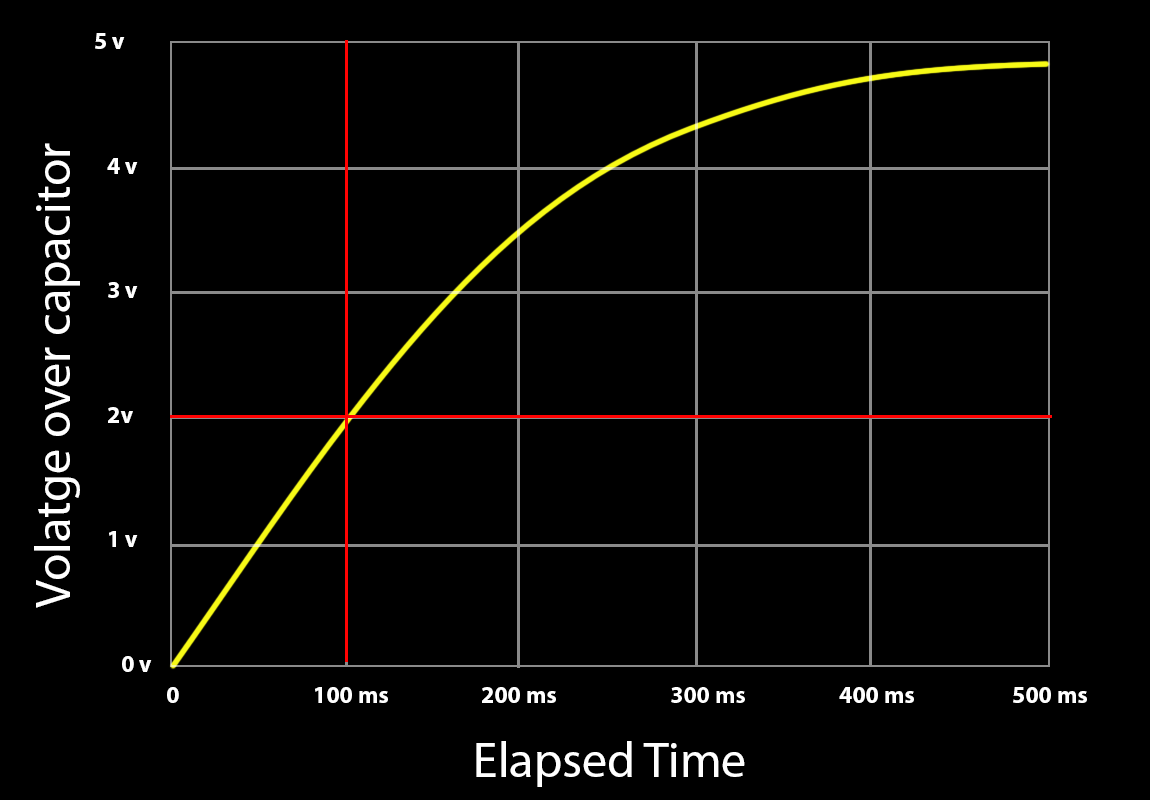
 

What we need to calculate is what is the time constant to achieve a rise of up to 2v at 100ms when the source voltage is 5v?

From there we can pick a value for either R or C can calculate the other. The maths around this might look a bit hairy but easy enough to plug into a calculator.  The equation to use is below - This is derived from capacitor charge equation.


Now we plug in out parameters
t = 100ms
Vs = 5v
Vc = 2v
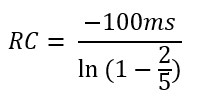
Where
RC = the Resistor Capacitor time constant
t = time duration
Vs = Voltage source
Vc = Voltage over capacitor
ln = Natural Log function

putting that into the calculator we get an RC value of 0.196 (rounded off)

RC = 0.196

Now we can pick a value or either R or C. I'll pick a capacitor of 10uF

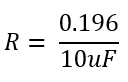
Rearrange the equation to solve for R
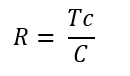
Which gives a resistor value of 19.6kOhm
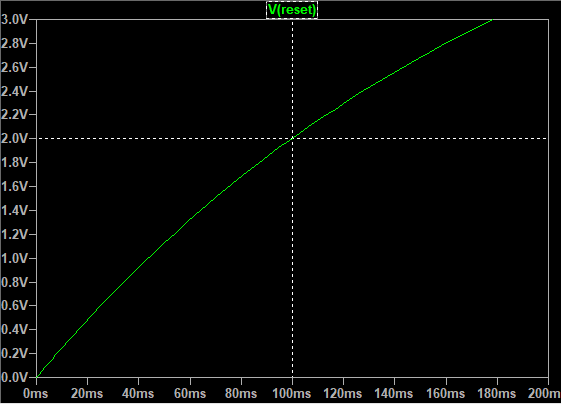
2V at 100ms - spot on! The voltage over the capacitor and hence the reset line will be below 2v for the 1st 100ms which is more than enough to get the circuits to settle..

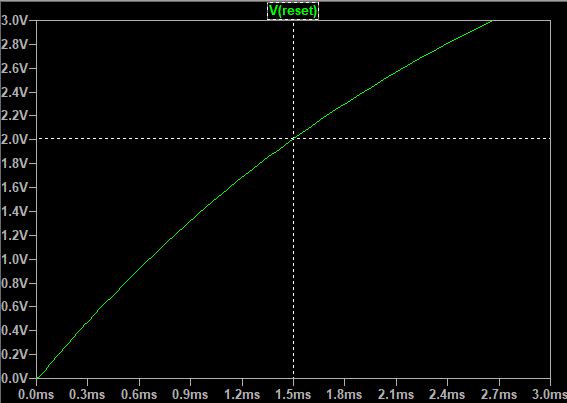
If you need to stick to the 3 or 6 clock cycles then just use the time in the equation above. For instance the time value for 6 clock cycles is 1.5mS.

RC = 0.0029

This time we can select a 1uF capacitor

which gives a resistor value of 2.9k Ohms


again - spot on.

A lot of examples for the RC values for the Z80 are

R = 10k
C = 47uF

which will hold the Reset low for just over 75ms which is way more than enough time for the processor and circuitry to settle down.
However, while this will work, there are two other aspects.
1. The voltage rise is not a sharp change and its always possible that as it passes the threshold between low and high it might not be as stable as you might think. this will be more of an issue the longer the time span is.
2. Its important, usually, to have a reset button and buttons add their own instability in due to very noisy contacts.

The answer to both of the above is the addition of a Schmitt trigger gate. This will provide a stable and sharp state change as well as debounce the button.

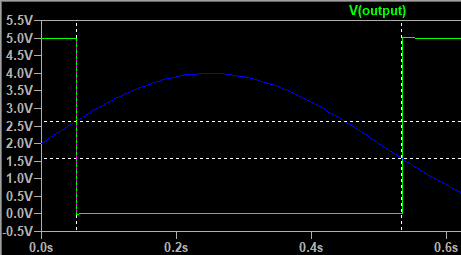
A Schmitt trigger includes some hysteresis which sets a window between two voltages, essentially latching the state while the signal is within the window.

The Schmitt trigger will have an upper threshold and a lower threshold and its only when the signal passes through this threshold from the other threshold that the state will change. This ensure that any noise or instability is rooted out.

The graph below shows the that state only changes to LOW when the input voltage rises from below 2.7v to above it and then will only change to HIGH when the voltage passes 2.7v and goes though the lower threshold of 1.6V. This means that it does not mapper what happens between 1.6V and 2.7v, the state will not change and this makes the circuit much more stable.
Generally a Schmitt Inverter is used for this, but will invert the state, so we need to add another one set it back again. This is also useful as then you have two reset signals, one HIGH one LOW which can then be used for different chips that have different Reset Active states.

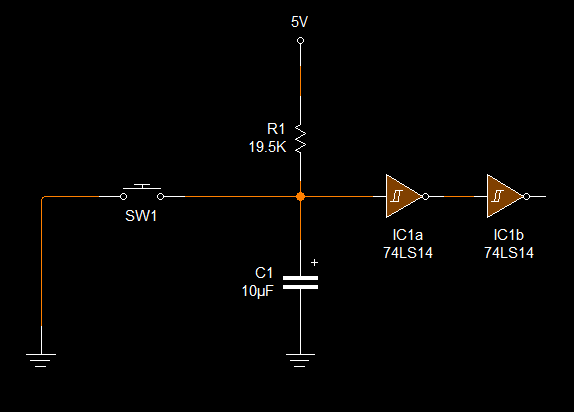
The final circuit would look like this for a 100ms power on reset:
GroClock update 1

GroClock update 1

Quick update - I have been looking at which processor to use and which Wifi module. I was considering using a Bluetooth module but that would have meant developing an iPhone /Android app which just adds to much to the project. So have decided to use a Wifi Module with a built-in web server to allow the additional configuration to be done via a web page.  Perhaps another time.

The processor, I just need an 8-bit processor with an LCD driver as this is really just a clock. Looking at the available STM8 processors, I think the STM8L152R8T would fit the bill. It has all the features I need:

  • 8 Bit processor
  • Timers
  • Real Time clock with calendar
  • USART (for debugging and or Wifi Module)
  • SPI and IC2 or interfacing other modules

For the wifi module, I'm looking at the SPWF01SA module from ST. This is a simpler module but seems to have a built in web server and restAPI capability so will have a play with it and see if this will work.

I havLCD Breakout boarde put together a breakout board for the clocks LCD. I needed  32 connectors for the flex ribbon to 2.54 pitch pins so that I can plug the LCD into a breadboard for testing and mapping out the LCD display. I have ordered the PCB from Ragworm.
Here is a zip file with the PCD file (Dip trace and Eagle Board) as well as the Gerber files.

LCD Test board v2

Next stage is to hook up and have a play with the Wifi Module to see if that is what I need.

Schmitt Trigger Oscillator

Schmitt Trigger Oscillator

The Schmitt Trigger Inverter oscillator is a very simple oscillator which can be useful but is also not very accurate or stable.

Pros

  1. Easy and simple circuit
  2. Easy timing calculation
  3. Useful for not critical oscillations or clock signal.

Cons

  1. Subject to frequency changes with temperature differences
  2. Subject to frequency changes with voltage supply differences - also influenced by the temperature
  3. Limited in frequency range on the higher level.
  4. Schmitt Trigger inverter was not designed for oscillation

Basic Principle

All oscillators are based on the same principle - a change in state between two voltages and a specified rate or frequency. Simple oscillators such as the Schmitt trigger oscillator use Resistor /Capacitor circuits for timing which is a simple and effective method. The resistor and capacitor size set the speed at which the capacitor is charged and discharged.

So what is a Schmitt trigger anyway?

"a Schmitt trigger is a comparator circuit with hysteresis implemented by applying positive feedback to the noninverting input of a comparator or differential amplifier. It is an active circuit which converts an analogue input signal to a digital output signal." reference Wikipedia

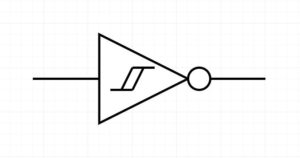
The two key factors here are 'Comparator' and 'Hysteresis'. The main point is that the inverter is setting two threshold points for comparison as thresholds for the 'flip' state. What this means is that between the two comparison points there is an area where a change in the signal does not affect the state of the output - this is Hysteresis  - ie the stoic portion of the inverter. The Schmitt trigger symbol gives the clue - two lines representing the two thresholds with the single input and output.

The reason for the two thresholds is for stability. If you only have one trigger point you have a very real risk of misfires if there is noise in the signal. With the two thresholds for the upper and lower bounds, the area in between holds the state regardless of the noise. This is call hysteresis - sticking point.

V+: Positive threshold (Min, Max and typical)
V-: Negative threshold (Min, Max and typical)
Vh: Histeroisis voltage (Min, Max and typical)

V+ is the voltage of the rising signal where the state will trigger
V- is the voltage of the falling edge where the state will trigger
Vh is the difference between the two.

This inverter is useful for converting a sine wave (or any changing wave) analogue signal to a square wave, also called a wave shaper.

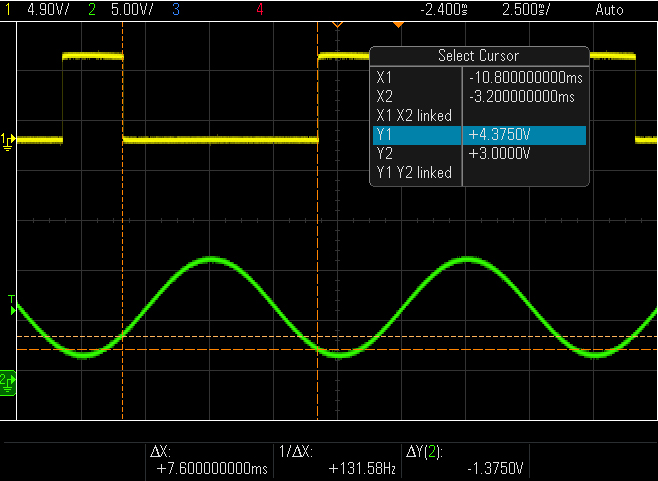
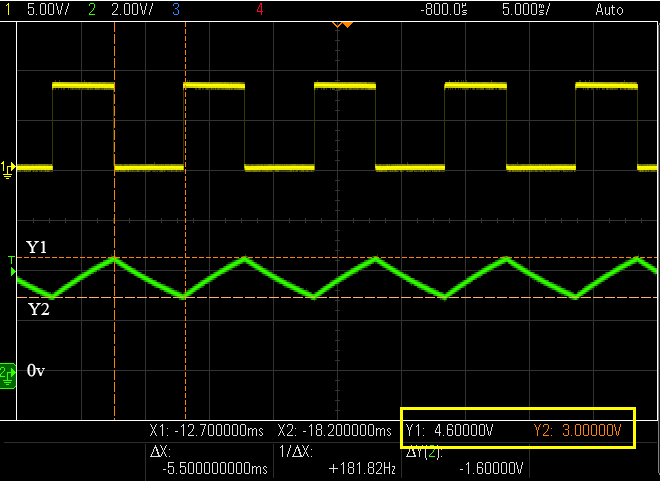
The waveform above shows the green sine wave (100Hz) input from a signal generator and the yellow is the inverted output. When the voltage of the sine wave rises above 4.3v the state of the inverter flips to 0v (inverted to the input of the positive rising input signal), the output does not change until the waveform drops below 3V. The difference in voltage between the two state changes is 1.3v which is the hysteresis voltage of this device. 

The positive and negative values will be different for different devices (TTL vs CMOS for example) and different supply voltages. 

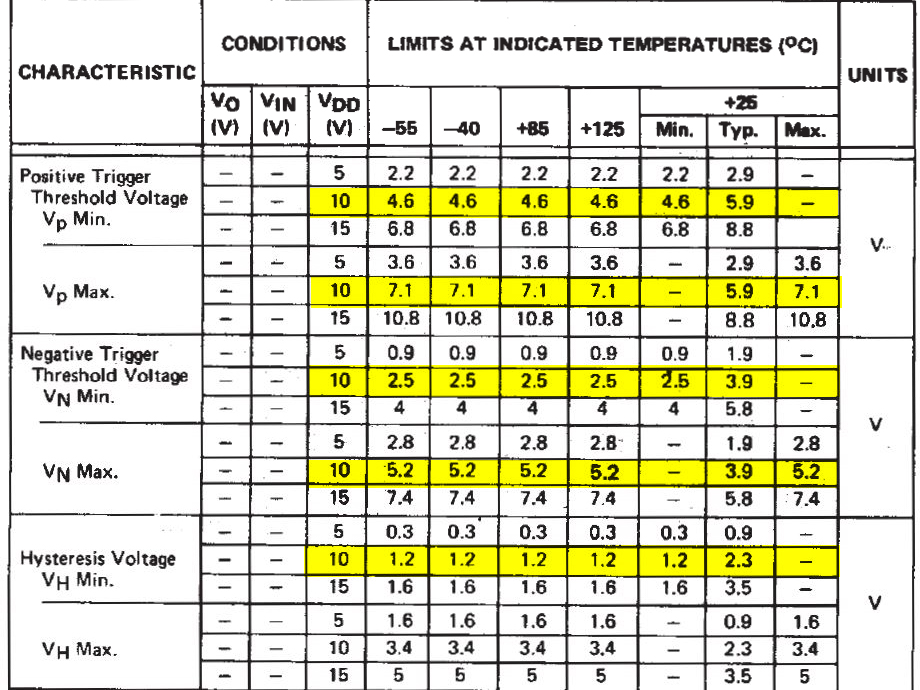
In the datasheet below for this device, highlighted in yellow for 10V, you can see the positive and negative thresholds. The right-hand columns show the typical values at 25 deg c. The values (Y1 and Y2) match up with the min column and the hysteresis ( difference between Y1 and Y2 ) value also fits into the min column. Voltages won't be exact as the temperature is not the same (currently much less than 25Deg in my office as I write this!) and not every device is the same. 

Note: As you can see from the temp and voltage columns, the threshold voltages vary considerably and this is the reason why this simple circuit is less than stable. 

Ok, so how does this help make an Oscillator?

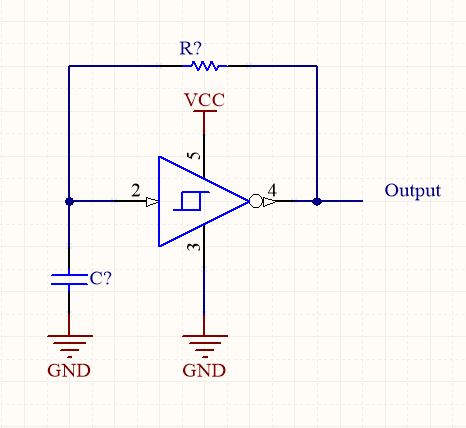
The hysteresis values are exactly what we need to create an oscillator. The upper and lower threshold values convert the input wave into a square wave by only triggering the inverter at the two different threshold points. What is needed now is an input signal that has feedback to keep the oscillation going and the way to do this is to set up delayed feedback from the output to the input of the inverter. We use an RC (resistor/capacitor) circuit to create timed feedback as follows.

The way this circuit works is very simple.

When the power is applied, the input (pin 2) is low and therefore the output (pin 4) is high. (because this is an inverter). Current then flows from the output through the resistor and starts to charge the capacitor.

As the capacitor changes, the input voltage starts to rise. When it reached the positive edge threshold (in this case about 4.5 volts), the input is sufficiently high enough to change the input to 'high' and therefore the output to 'low'.

Once the output is low the capacitor can discharge via the resistor, slowly lowering the input voltage at pin 2 until the voltage passes below the negative threshold voltage of about 3 volts where the inverter output flips back to 'High' and the process starts all over again creating a contained oscillator.

The magic is the two thresholds that allow for the state of the inverter to remain while the voltage is changing. If it were a single threshold, it would just generate a spike and not a clean square wave.

Setting the frequency

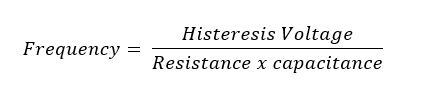
The frequency is a simple calculation, (you can get really complicated about it, but for the purposes of a simple circuit, a simple calculation will work) The trick, in this case, is to remember to use the hysteresis voltage for the calculation as its the distance between these two values there the RC timing takes place.

In other words the hysteresis voltage is a portion of the total voltage at the input pin as the voltages either side of the thresholds do not affect the state,

Remember that the larger the resistor or capacitor, the longer the capacitor takes to change and therefor setting either of these sets the charge/discharge timing.

Time = Resistor x Capacitance.

so the formula is :

The hysteresis voltage is included in the calculation because the charge and discharge of the capacitor happen between the positive and negative thresholds and so we use the difference between these values which is called the hysteresis voltage.

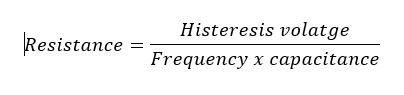
It's usually better to choose the capacitor and then calculate the resistance needed as its easier to fine tune the resistance. The value is very unlikely to be an exact resistor value so you can then either create the correct resistance using serial and or parallel resistors or a potentiometer - this is much easier than trying with capacitors.

So we need to switch the formula around to calculate the resistance needed.

For this example I have chosen a 44nF ceramic capacitor.

Plugging in the values

Frequency = 100
capacitance = 44nF
Histereses Voltage = 1.3v

Giving a Resistor value of 295,545 ohms or closest value 300K ohm.

If you want a smaller resistor then choose a bigger capacitor value.

The oscilloscope capture above shows the green sawtooth wave that is generated by the resistor and capacitor circuit. As with the injected sign wave in the previous oscilloscope diagrams,.
You will notice that the triggering on the yellow square wave output is at the peak and trough of the sawtooth wave! This is the resultant wave caused when the inverter changes stage from High to Low. Looking at values Y1 and Y2 (in the yellow rectangle) you can see that they match the Positive and negative threshold values.

Microsoft Surface Pro 4 Repair

Microsoft Surface Pro 4 Repair

I was given a Surface Pro 4 to repair and was told that the user stood on it and hence the screen cracked. However.... once I managed to open it (something that was far more difficult than I would have hoped for) I realised that actually, cause of the cracked screen was the battery!! It was failing and that meant that it was expanding which pushed and cracked the screen. So this ended up being a process of replacing the screen and the battery.

I bought the spare parts from here:

Screen & battery: https://www.replacebase.co.uk/microso... Microsoft Surface Pro 4 Replacement Complete LCD Touch Screen Glass Assembly - OEM RBSKU6637